Subscription Plans
The Subscription Plans module allows you to create, manage, and configure different subscription tiers for your platform. Plans control what predictions users can access, how signals are delivered, and what features are available.
Accessing Manage Plans
- Log in to the admin panel at
https://your-domain/admin - Click Manage Plans in the sidebar under "Prediction Areas"
- You will land on the Manage Plans page
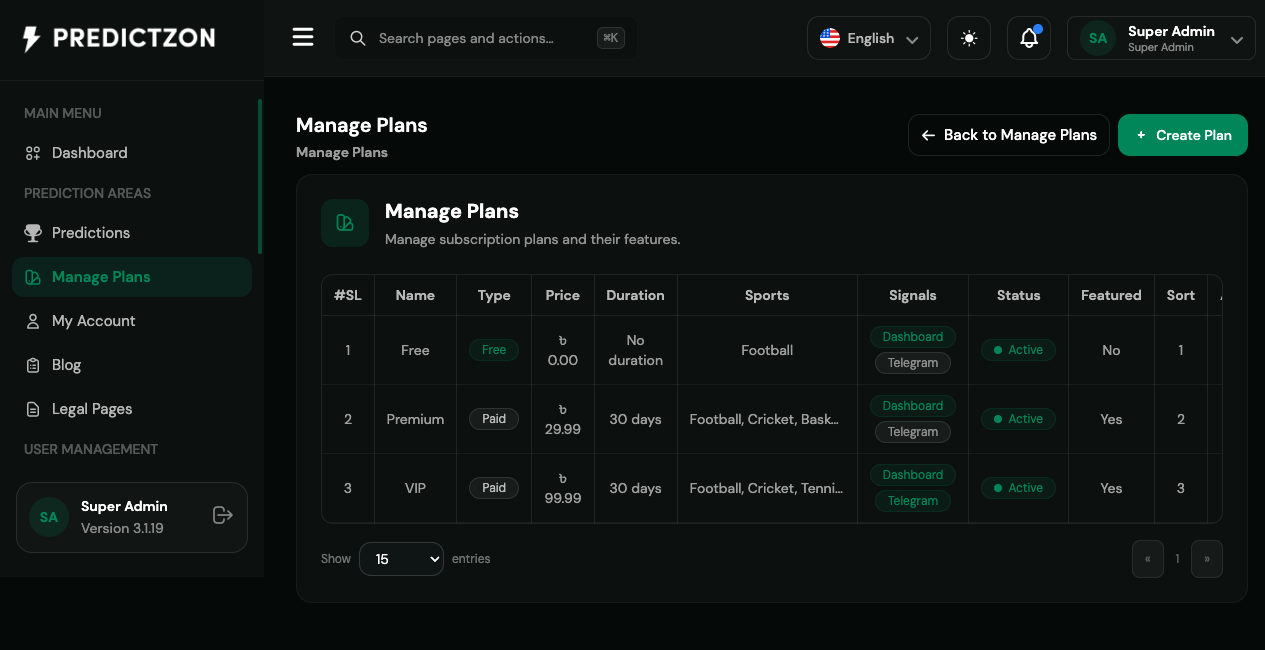
Plans Overview
The Manage Plans page displays all subscription plans in a table with the following columns:
| Column | Description |
|---|---|
| #SL | Serial number / sort order |
| Name | Plan name (e.g., Free, Premium, VIP) |
| Type | Free or Paid |
| Price | Subscription price with currency symbol |
| Duration | Billing period (e.g., "30 days", "No duration") |
| Sports | Sports included in the plan |
| Signals | Signal delivery channels (Dashboard, Telegram) |
| Status | Active/Inactive toggle |
| Featured | Whether plan is highlighted on frontend |
| Sort | Display order on frontend |
| Actions | Edit and Delete buttons |
Creating a New Plan
- Click the Create Plan button in the top-right corner
- Fill in the plan details:
Basic Information
| Field | Description |
|---|---|
| Name | Plan display name (required) |
| Description | Detailed plan description |
| Price | Subscription price (required for paid plans) |
| Billing Period Days | Subscription duration in days (0 = lifetime) |
Sport Access
Select which sports are included in this plan:
- Choose from available sports (Football, Cricket, Tennis, Basketball, etc.)
- Users subscribed to this plan will only see predictions for selected sports
Signal Delivery
| Setting | Description |
|---|---|
| Dashboard Signal Enabled | Show predictions on the user dashboard |
| Telegram Channel Enabled | Send predictions via Telegram |
| Telegram Channel ID | Telegram channel/chat ID for delivery |
| Delivery Speed | How quickly signals are delivered |
| Signal Details Level | Level of detail in prediction messages |
Premium Features
| Feature | Description |
|---|---|
| Confidence Rating Included | Show confidence percentage on predictions |
| Historical Results Access | Access to past prediction results |
| Experts Access Count | Number of expert tipsters available |
| Priority Support Enabled | Access to priority support channel |
| Priority Support Channel | Support channel identifier |
| Early Access VIP Signals | Get signals before other tiers |
Display Settings
| Setting | Description |
|---|---|
| CTA Button | Call-to-action button text |
| Badge Label | Badge displayed on the plan card |
| Is Active | Whether plan is available for subscription |
| Is Featured | Highlight plan on frontend pricing page |
- Click Save to create the plan
Editing a Plan
- Click the Edit button (pencil icon) in the Actions column
- Modify the plan details as needed
- Click Save to update
Note: Changing a plan's price does not affect existing subscribers. They will be charged the new price upon renewal.
Deleting a Plan
- Click the Delete button (trash icon) in the Actions column
- Confirm the deletion when prompted
Warning: Deleting a plan will not cancel existing subscriptions. Users will retain access until their current billing period expires.
Plan Types
Free Plans
- No payment required
- Limited sport access
- Basic signal delivery
- Dashboard-only signals
Paid Plans
- Require payment gateway configuration
- Full sport access based on selection
- Multiple delivery channels (Dashboard + Telegram)
- Premium features enabled
Default Plans
The platform comes with three default plans:
| Plan | Type | Price | Sports | Features |
|---|---|---|---|---|
| Free | Free | ৳ 0.00 | Football | Dashboard + Telegram signals |
| Premium | Paid | ৳ 29.99 | Football, Cricket, Basketball | Dashboard + Telegram signals, Featured |
| VIP | Paid | ৳ 99.99 | Football, Cricket, Tennis, Basketball | Dashboard + Telegram signals, Featured |
Best Practices
- Start with a Free plan — Allow users to experience your platform before upgrading
- Price competitively — Research competitor pricing in your market
- Limit Free plan sports — Encourage upgrades by restricting sport access
- Use Featured flag — Highlight your most profitable plan on the pricing page
- Set appropriate durations — Monthly plans provide recurring revenue
- Configure Telegram channels — Ensure Telegram delivery is working before enabling
Related Pages
- Predictions — Manage the predictions available in each plan
- Payment Gateway — Configure payment processing for paid plans
- Manage Users — View user subscriptions and plan assignments