Manage Users
The Manage Users module provides comprehensive user management capabilities, including viewing user profiles, managing subscriptions, handling KYC verification, and controlling user access.
Accessing Manage Users
- Log in to the admin panel at
https://your-domain/admin - Click Manage Users in the sidebar under "User Management"
- You will land on the Manage Users hub page
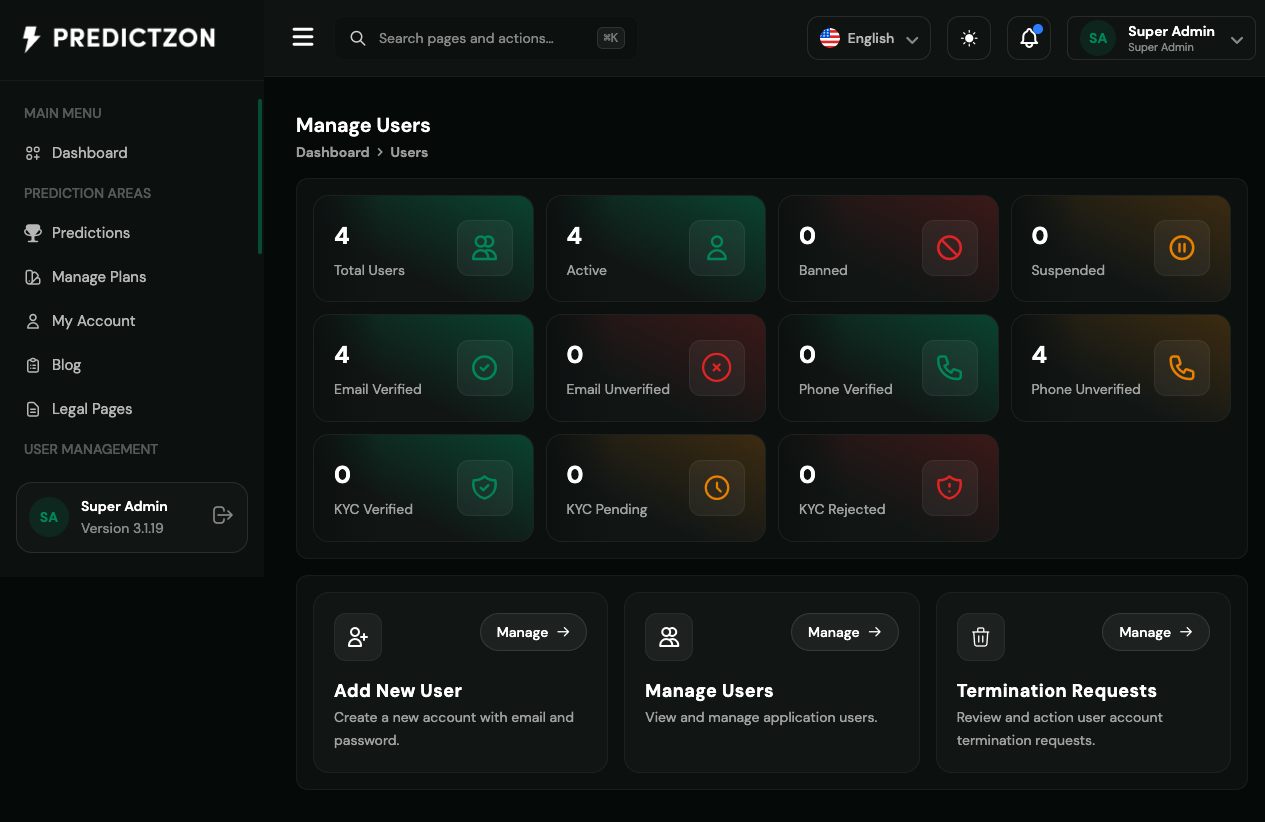
Users Overview
The Manage Users hub displays summary statistics and management modules:
Summary Statistics
| Metric | Description |
|---|---|
| Total Users | All registered users |
| Active Users | Users with active status |
| Banned Users | Users who have been banned |
| Suspended Users | Users with suspended access |
| Email Verified | Users with verified email |
| Email Unverified | Users pending email verification |
| Phone Verified | Users with verified phone |
| Phone Unverified | Users pending phone verification |
| KYC Approved | Users with approved identity verification |
| KYC Pending | Users awaiting KYC review |
| KYC Rejected | Users with failed KYC verification |
Management Modules
| Module | Description |
|---|---|
| Add New User | Create a new user account manually |
| Manage Users | View, edit, and manage existing users |
| Termination Requests | Handle user account deletion requests |
Managing Users
Navigate to Manage Users → Manage Users to access the user list.
User List
The user table displays:
| Column | Description |
|---|---|
| Avatar | User profile picture |
| Name | User's display name |
| User's email address | |
| Phone | User's phone number |
| Status | Active, Banned, or Suspended |
| Email Verified | Verification status |
| KYC Status | Identity verification status |
| Registered | Registration date |
| Actions | View, Edit, and management buttons |
Creating a User
- Click the Create User button
- Fill in the user details:
- Name — User's display name (required)
- Email — Email address (required, must be unique)
- Phone — Phone number (optional)
- Password — Initial password (required)
- Role — Assign a role for permissions
- Status — Active, Suspended, or Banned
- Click Save to create the user
Editing a User
- Click the Edit button on the user row
- Modify user details as needed
- Click Save to update
User Detail Views
Click on a user to access detailed information:
User Details
- Profile information
- Account status and verification
- Subscription details
- Activity history
Login History
- All login attempts
- IP addresses and devices
- Login timestamps
- Failed login attempts
Wallet Transactions
- Deposit and withdrawal history
- Transaction status
- Payment method used
- Transaction timestamps
Payment Logs
- Payment gateway transactions
- Transaction IDs and amounts
- Status and timestamps
Withdrawal Logs
- Withdrawal requests
- Approval/rejection status
- Processing timestamps
Referrals
- Users referred by this user
- Referral commission earned
- Referral level
Active Sessions
- Current active sessions
- Device and browser information
- Last activity timestamp
User Management Actions
Suspension
Suspend a user's account temporarily:
- Click the Suspend button
- Confirm the suspension
- User loses access until unsuspended
Banning
Permanently restrict a user's access:
- Click the Ban button
- Confirm the ban
- User cannot access the platform
Email Verification
Manually verify a user's email:
- Click Verify Email button
- User's email is marked as verified
Phone Verification
Manually verify a user's phone:
- Click Verify Phone button
- User's phone is marked as verified
Balance Adjustment
Adjust a user's wallet balance:
- Click Adjust Balance
- Enter the adjustment amount (positive or negative)
- Add a reason for the adjustment
- Confirm the adjustment
Send Notification
Send a custom notification to a user:
- Click Send Notification
- Compose the message
- Choose delivery channel (Email, SMS, Telegram)
- Send the notification
Best Practices
- Review new users — Check newly registered users periodically
- Monitor KYC status — Process KYC requests promptly
- Handle suspensions carefully — Document reasons for suspensions
- Respond to termination requests — Process deletion requests within required timeframes
- Export user data — Keep backups of user information
- Audit user activity — Regular review of login history and transactions
Related Pages
- KYC Verifications — Process identity verification requests
- Roles & Privileges — Manage user permissions
- Payment Gateway — View user payment history
- Withdrawal Gateway — Process user withdrawals