Referral Dashboard
The Referral Dashboard shows your referral performance, earnings, and a visual tree of your referral network. Share your referral link to earn commissions when new users subscribe.
Accessing the Referral Dashboard
- Log in to your account
- Click Referral in the sidebar
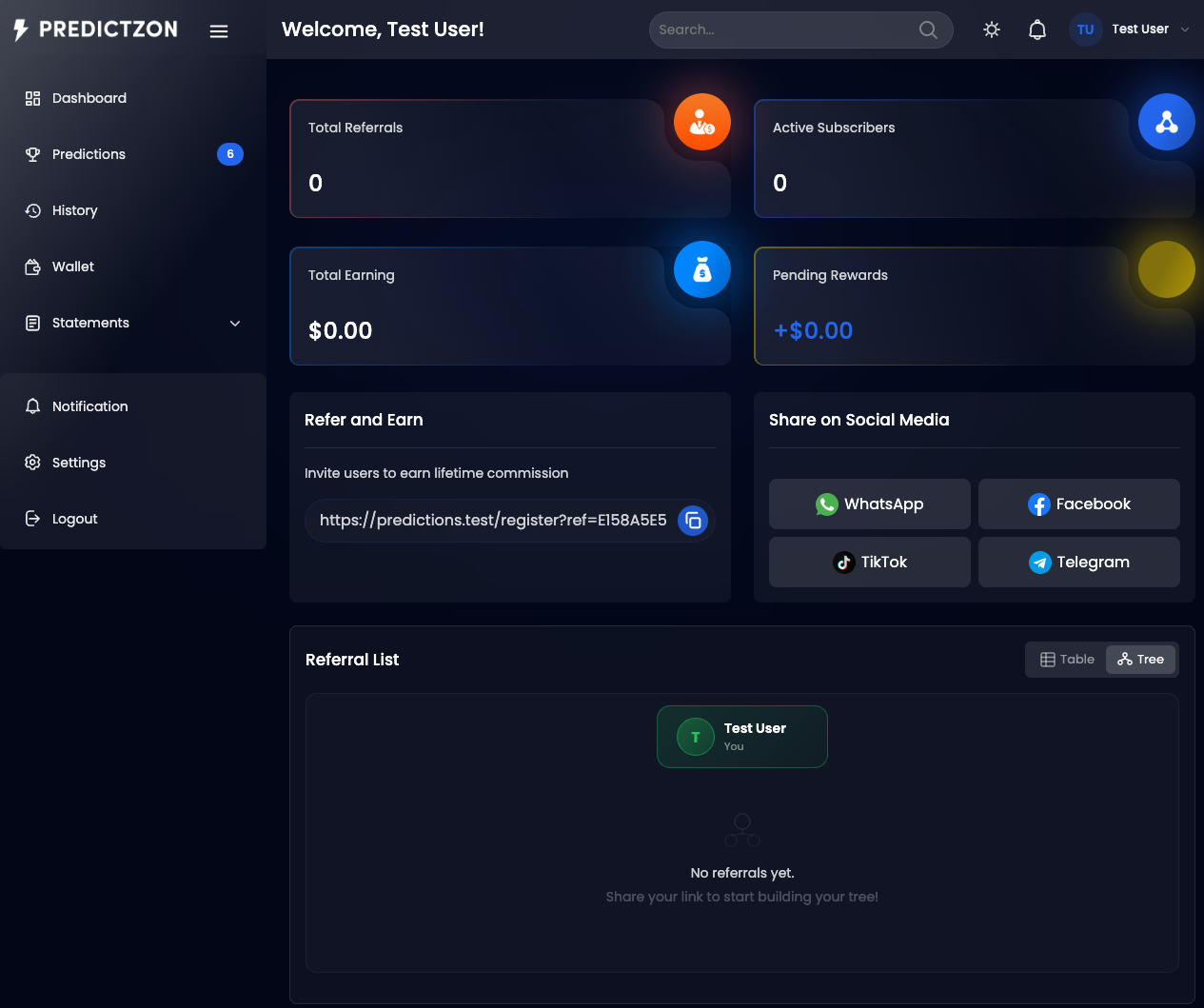
Referral Stats
At the top of the page, key metrics are displayed:
| Metric | Description |
|---|---|
| Total Referrals | Number of users who registered via your link |
| Active Subscribers | Referrals with active paid subscriptions |
| Total Earnings | Total commission earned from all referrals |
| Pending Rewards | Earnings awaiting approval or payout |
Referral Link
Your personal referral link is displayed with:
| Action | Description |
|---|---|
| Copy | Copy the link to your clipboard |
| Share | Share via WhatsApp, Facebook, TikTok, or Telegram |
The referral link format is: https://your-domain/register?ref=YOUR_CODE
Referral Tree
A visual tree chart shows your referral network hierarchy:
- Level 1 — Users who registered directly via your link
- Level 2 — Users who registered via your Level 1 referrals
- Level 3+ — Deeper levels based on your referral system configuration
Toggle between Tree View and Table View using the view mode buttons.
Referred Users Table
A paginated table lists all your referrals:
| Column | Description |
|---|---|
| Name | Referral's display name |
| Level | Referral level (1st, 2nd, etc.) |
| Joined Date | Registration date |
| Plan | Their current subscription plan |
| Reward | Commission earned from this referral |
| Status | Active, Pending, etc. |
Filtering Referrals
| Filter | Description |
|---|---|
| Search | Search by referral name |
| Status | Filter by status |
| Date Range | Filter by join date |
How Referral Earnings Work
- Share your link — Send your referral link to friends and network
- User registers — They create an account using your link
- User subscribes — They purchase a paid plan
- You earn commission — A commission is credited to your wallet based on the plan price and your referral level
Tips
- Share on social media — Use the built-in share buttons for maximum reach
- Track your tree — Monitor which referrals are converting to paid plans
- Encourage upgrades — Higher plan purchases mean higher commissions
- Withdraw earnings — Transfer referral earnings to your bank account
Related Pages
- Wallet — View referral earnings and withdraw
- Plans & Subscriptions — See which plans earn the most commission