User Dashboard
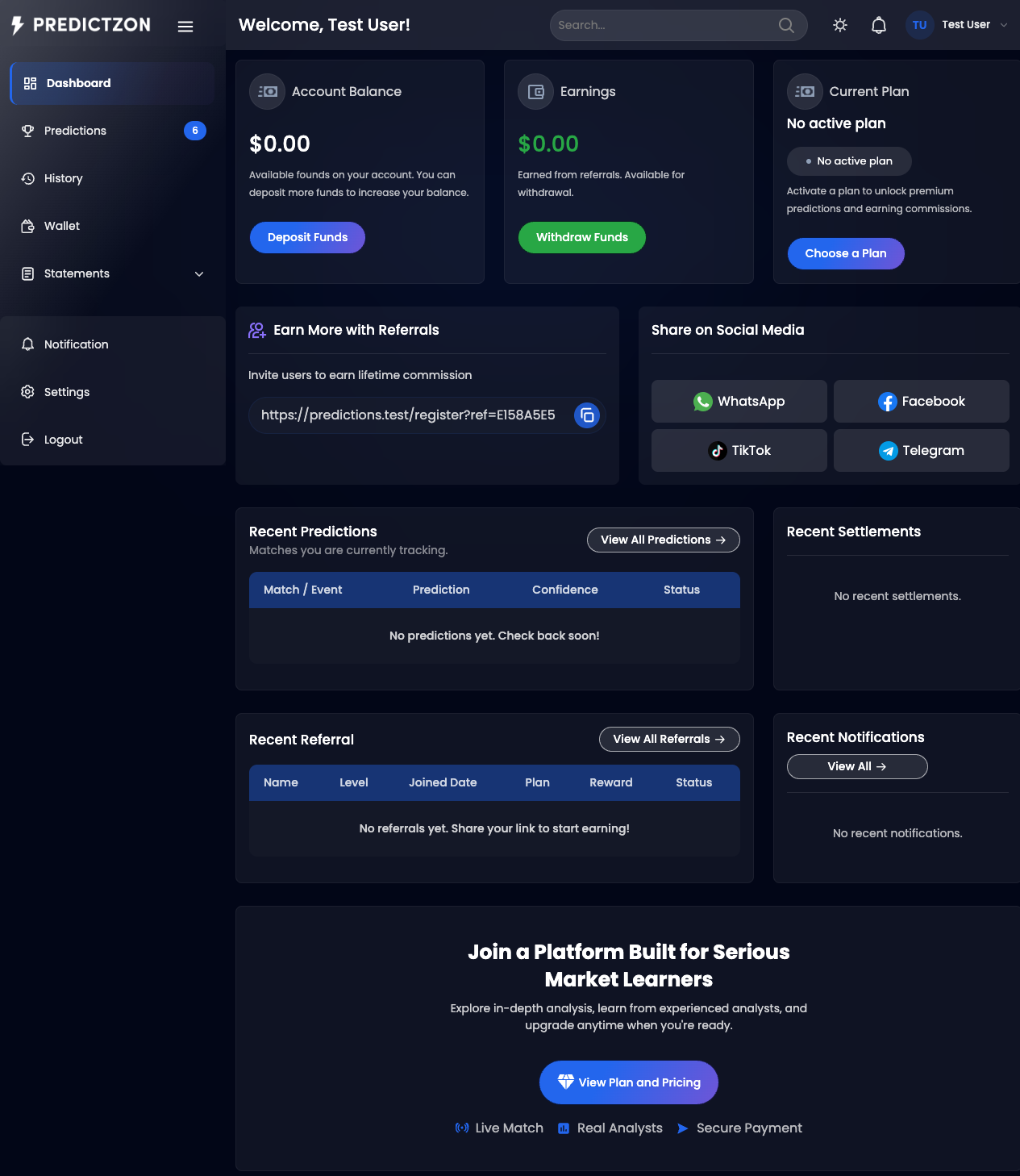
The User Dashboard is your home screen after logging in. It provides a quick overview of your account balance, earnings, active subscription, and recent activity across predictions, referrals, and notifications.
Accessing the Dashboard
After logging in, you are redirected to the Dashboard by default. You can also access it anytime from the sidebar by clicking Dashboard.
Key Widgets
The top section displays three cards:
| Widget | Description |
|---|---|
| Account Balance | Your available wallet balance, with a Deposit Funds button |
| Earnings | Total referral earnings, with a Withdraw Funds button |
| Current Plan | Your active subscription plan, or a prompt to choose one |
If you have an active subscription, the Current Plan widget shows your plan name, expiry date, and an Upgrade button. If you have no active plan, it displays a Choose a Plan link.
Referral Link
Below the key widgets, your personal referral link is displayed with a Copy button. Share this link to earn commissions when new users subscribe.
Social sharing buttons are also available:
- TikTok
- Telegram
Recent Predictions
A table showing your most recent published predictions with:
| Column | Description |
|---|---|
| Match / Event | Sport and team names |
| Prediction | The predicted outcome |
| Confidence | Confidence rating (if included in your plan) |
| Status | Win, Loss, Pending, or Void |
Click View All Predictions to see the full list.
Recent Referrals
A table showing your most recently referred users with:
| Column | Description |
|---|---|
| Name | Referral's display name |
| Level | Referral level (1st, 2nd, etc.) |
| Joined Date | When they registered |
| Plan | Their current subscription plan |
| Reward | Commission earned |
| Status | Active, Pending, etc. |
Click View All Referrals to see the full referral dashboard.
Recent Notifications
Displays your latest notifications. Click View All to see the full notification inbox.
Call to Action
At the bottom of the dashboard, a banner encourages you to explore plans and pricing if you don't have an active subscription.
Tips
- Deposit funds to subscribe to paid plans for premium predictions
- Share your referral link to earn commissions from your network
- Connect Telegram for instant prediction delivery
- Check your dashboard regularly for the latest predictions
Related Pages
- Live Predictions — Browse current prediction signals
- Wallet — View balance and transactions
- Plans & Subscriptions — Browse and subscribe to plans